
Platform Overview
In this lesson we’re going to give you a high-level introduction to familiarize yourself with the Worksuite platform. We’ll also cover some key terminology or “platform language” that will be helpful to know. Basically, this is your lay of the land.
Why is this important?
Worksuite is a sophisticated platform, with a lot of flexible features that all tie together. Once you know the key terms and modules, you can better configure it to your exact needs.
Of course, we can configure the platform to your organization’s vocabulary, so don’t worry if you see some words that look different than your team’s everyday language. It can all be changed!
This is just a quick overview of the top things you should know as you get setup in Worksuite. And then you can know what needs configuring (or not).
Platform Modules
Each main area of the Worksuite platform is called a “module.”
The 6 primary modules are:
- Talent Directory (aka Index / Profiles / Rolodex)
- Marketplace (aka Job Openings / Opportunities / Requisitions)
- Tasks & Projects (some clients may call this “Brands”)
- Payments (aka Invoices)
- Onboarding (aka Workflows / Automations)
- Insights (aka Analytics / Business Intelligence / Workforce Analytics)
You can navigate between modules by using the left-hand sidebar of Worksuite.
Cheat Sheet: 9 Key Terms to Know
Your dedicated Worksuite Support team may use certain lingo when guiding you through solutions, so it’s important to know what we’re talking about!
- Tenant Term = a dynamic variable word that appears EVERYWHERE in Worksuite.For example, if you change the tenant term “Partners” to Freelancers, Vendors, Coaches or Contractors, this will reflect accurately in all places. Or if you change “Payments” to Invoices.
- Tenant = your Worksuite environment.
- Partner = vendor, freelancer, contractor, coach etc. By default your workspace will say “Partner” – but this is a Tenant Term we can change to whatever you call your talent.
- Filter = a way to sort items in your Worksuite environment. You may use Filters when surfacing top talent, organizing invoices, managing tasks & projects and more.
- Custom Field = a piece of data you want to collect from everyone who comes in, and which isn’t already standard in Worksuite. The sky’s the limit to how you can configure your Custom Fields — in Talent Profiles, candidate applications, onboarding and more.
- Opportunities = Job Openings, or Requisitions. This is another Tenant Term we can change for you, too!
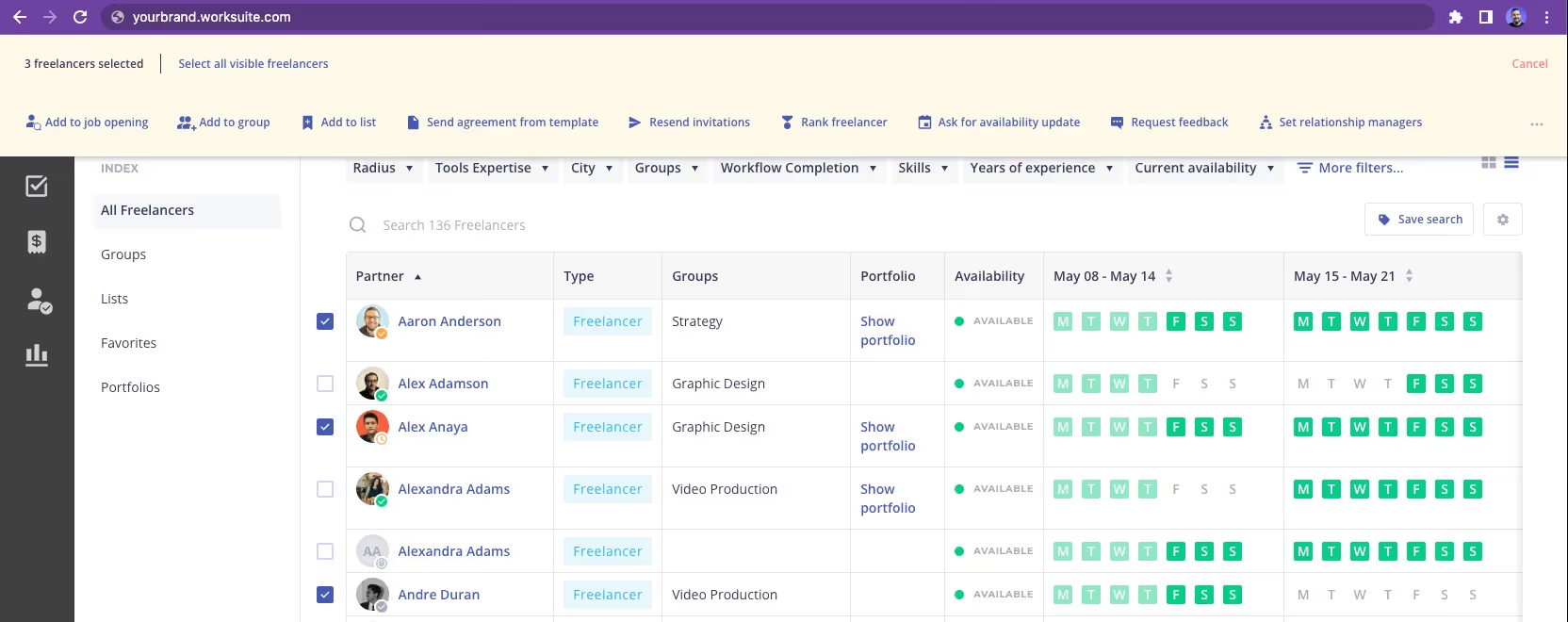
- Bulk Actions = allow you to perform certain operations on multiple items at the same time. Whether that’s bulk-inviting talent; bulk-reminding them to fill out their payment details; bulk-approving invoices; bulk-adding talent to a list/group/workflow, and more.
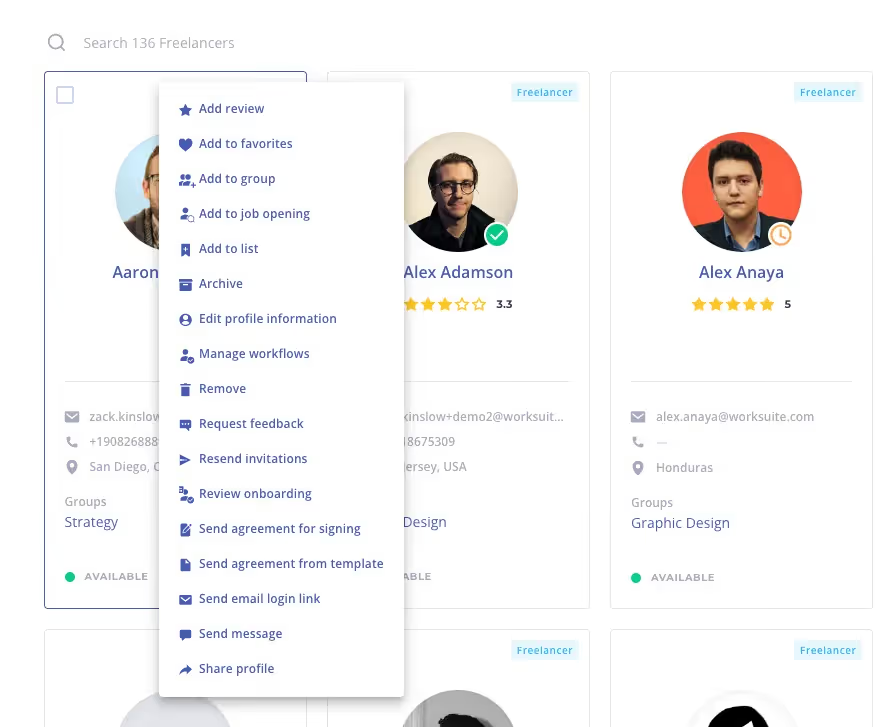
- Quick Actions = from “Card view” in your Talent Directory, click the 3 dots ••• on a given contractor, and you’ll see a dropdown with 15+ Quick Actions you can take with 1 click.
- Feature Flag = something we activate for you in the back-end of Worksuite. You may occasionally hear the Support team mention, “we can turn on that feature flag for you.” An example might be, say you saw a new feature being talked about in our newsletter, but it’s so new that it may not be visible yet in your current view. You can request to have it turned on.
Exercise
- Spend 5 minutes clicking around to familiarize yourself with the different modules.
- Decide what you want to call the “Partners” tenant term. How does your team refer to talent? Let us know, and we’ll configure it for you! support@worksuite.com
Next lesson
Branding Your Environment
View →