
9 min read
Last updated: April 2026
TL;DR: Self-serve reporting in a contingent workforce management platform means any authorized user in Finance, Operations, HR, or Procurement can access, filter, and export workforce data on-demand, without submitting a request to a vendor, a CSM, or IT. The most important reports cover spend by worker type, invoice status, onboarding completion, engagement expiry, and budget vs. actuals at the project level. Platforms like SAP Fieldglass, Beeline, and Coupa offer reporting modules, but they are typically built for procurement and MSP workflows — not for the Resource Ops and Finance teams managing the contingent workforce program day-to-day. This article explains what self-serve reporting is, why it matters, and what to look for when evaluating platforms like Worksuite.
The Problem Most Workforce Managers Don't Realize They Have
Ask an operations or finance leader how they track freelance spend and the answer is usually some version of: "We email someone and wait."
A Finance Director at a global media company put it plainly:
"The biggest challenge we have is around the ability to report on costing and where it sits — because everything is so manually done at the moment."
An Operations Manager at a creative agency described their current setup without embarrassment:
"We track spend in a Google Sheet."
Neither of these is an unusual answer. Across contingent workforce programs of all sizes, the ability to see what's happening — who's working, what's been approved, what's been paid, and what's still pending — is routinely locked inside someone else's inbox or a system that requires a support ticket to extract.
The scale of this problem is growing. The global gig economy is projected to grow from $674 billion in 2026 to $2.5 trillion by 2035 (Business Research Insights, 2026), and demand for project-based white-collar talent — consultants, designers, engineers, and contract professionals — grew 38% in FY25 alone (Flexing It). As contingent workforce programs expand, the gap between how much freelance work is happening and how much of it is actually visible to finance and operations teams widens.
According to Ardent Partners' annual State of Contingent Workforce Management research, the single biggest gap separating best-in-class programs from average ones is spend visibility — top-performing organizations manage 80% or more of their contingent spend under formal tracking systems, while the average program manages less than half. As the freelance workforce scales toward a $2.5 trillion global market, that visibility gap becomes a strategic liability, not just an operational inconvenience.
That's the problem self-serve reporting is designed to solve.
In our own analysis of customer and prospect conversations in a single month, the most frequently asked question — across enterprise and mid-market companies alike — was some version of: "Can I pull this report myself, without going through you?"
What Is Self-Serve Reporting for Contingent Workforce Programs?
Self-serve reporting refers to the ability for internal stakeholders — operations managers, finance teams, HR leads, and procurement directors — to access, filter, and export workforce data on their own, without needing to request it from a vendor, a customer success manager, or an IT team.
In a mature freelance management system (FMS) or vendor management system (VMS), self-serve reporting typically covers:
- Spend by worker, project, cost center, or department — including breakdowns by worker type (IRS Form 1099-NEC, W-2, EOR, AOR)
- Invoice status — submitted, pending approval, approved, paid, or rejected
- Onboarding completion — who has finished their compliance workflow and who has stalled
- Engagement status — active, expiring within 30/60/90 days, or lapsed
- Headcount and utilization — across all worker classifications
- Payment history and funding activity — with reconciliation exports for finance and audit
The keyword is on-demand. A self-serve reporting environment means a Finance Manager can pull a weekly spend summary on a Tuesday afternoon without scheduling a call. It means an Ops Director can check how many contractors haven't completed onboarding before a Monday kickoff — not after.
Self-serve reporting is distinct from a standalone business intelligence or workforce analytics tool like Tableau or Power BI. Those tools are powerful but require data pipelines, technical configuration, and often dedicated analyst support to maintain. Self-serve reporting inside a workforce platform is pre-built around the specific data model — workers, engagements, invoices, payments — so it is usable by non-technical program managers without setup or IT involvement.
Self-Serve vs. Vendor-Mediated Reporting: What's the Difference?
|
Capability |
Vendor-Mediated Reporting |
Self-Serve Reporting |
|
Time to get a spend report |
1–3 business days |
Immediate |
|
Who can access |
Admin or CSM only |
Any authorized internal user |
|
Scheduled exports |
Manual request each time |
Configurable (weekly, monthly) |
|
Budget vs. actual visibility |
End-of-month summary, if requested |
Real-time, at project level |
|
Invoice status |
Requires support ticket or call |
Live, filterable by worker/approver |
|
Onboarding status |
Periodic snapshot |
Live, with completion tracking |
|
Audit-readiness |
Scramble to compile at year-end |
Always exportable in CSV/Excel |
|
Finance system integration |
Manual export + re-entry into NetSuite/QuickBooks/Workday |
API or scheduled feed |
|
Access control |
Binary (admin or nothing) |
Role-based (ops, finance, HR, procurement) |
The practical difference is compounding. When reporting requires a vendor, teams stop asking. Decisions get made without data. Overspend gets discovered late. And the contingent workforce program loses credibility internally — not because it's failing, but because it can't show what it's doing.
Why This Matters More Than Most Teams Realize
The absence of self-serve reporting creates two compounding problems.
First, it slows down decisions. When data lives in a vendor's system and requires a request to extract, teams default to working without it. Budgets are managed on intuition. Approvals bottleneck because no one can see the full picture. An Operations Director at a large marketing agency described the frustration directly:
"Is there a way for us to go into the platform directly and pull those reports ourselves — just in case, so we don't have to bug anyone or create a backlog?"
That question — asked in the middle of an active rollout — signals something important: the need for reporting isn't a nice-to-have. It's a blocker. When the answer is "you have to ask us," it introduces friction at every decision point downstream.
Second, it hides spend that matters. A Finance Manager at a mid-sized agency described a scenario that resonates with almost every workforce program at scale:
"I set a $120,000 project budget, invoices were paid against it, and there's no view showing me where I stand. No progress indicator, nothing."
Without a live, accessible view of spend against budget, workforce programs run blind. Overspend gets discovered late. Strategic decisions — like whether to continue freelancing a role or hire full-time — never get made because the data to make them isn't visible. An Operations Director at a creative studio made exactly this connection:
"We spent $200,000 this year on freelance. We dug into it and realized half of that was one design role — we'd basically paid a full salary in freelance fees. We should have hired someone."
That insight only exists if the data is accessible in the first place. This is what Ardent Partners refers to as "spend under management" — the proportion of contingent labor expenditure that is actively tracked, categorized, and visible to program owners. Most organizations are significantly below where they need to be. Self-serve reporting is the mechanism that turns raw data into accessible workforce intelligence — closing that gap without requiring an MSP, a BI team, or a Workday implementation.
This urgency is compounding. With white-collar freelance demand growing 38% year-over-year and the overall gig economy on pace to nearly quadruple by 2035 (Business Research Insights, 2026), the volume of contingent workforce data that needs to be tracked, categorized, and reported on is increasing faster than most teams' manual processes can handle.
The 5 Reports Every Contingent Workforce Program Should Be Able to Pull Without Vendor Help
Based on the workforce metrics that program managers ask for most consistently, these are the five reports that should be standard, accessible, and exportable in any contractor management platform worth evaluating:
1. Weekly Spend Summary (by Worker Type)
A consolidated view of what was paid out in a given period, broken down by 1099 (IRS Form 1099-NEC filers), W-2 payroll workers, EOR (Employer of Record), and AOR (Agent of Record) engagements. As one Operations Director put it:
"I just need a weekly snapshot of full spend — 1099 and W-2 combined — because to me it's one budget, even though we're engaging them differently."
2. Invoice Status Report
Which invoices are submitted, pending approval, approved, paid, or rejected — filterable by worker, approver, project, or cost center. This is the report that eliminates the most back-and-forth email chains and is the first thing a Finance team asks for when a payment is late.
3. Onboarding Completion Tracker
Who has been invited, who has started their compliance workflow, who is complete, and who has stalled. This report is especially critical for programs that rely on bulk contractor onboarding, where incomplete profiles create payment holds and compliance gaps at scale. An Operations Manager at an engineering firm asked a question that gets to the heart of this:
"What's the process for getting that data — do we have to contact you every time we need it?"
The answer should always be no.
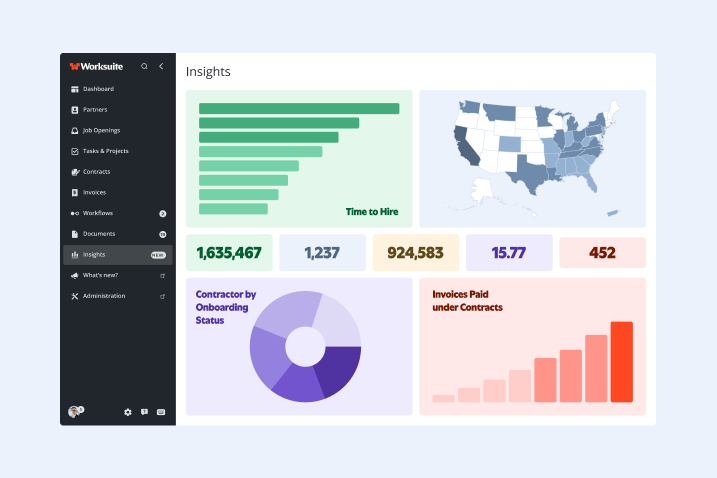
4. Engagement Expiry Report
Which engagements are active, which are expiring in the next 30/60/90 days, and which have already lapsed. Without this, workforce managers rely on memory — or worse, find out a contractor's engagement has ended when the contractor stops getting paid. This report also supports independent contractor compliance management, since lapsed or incorrectly extended engagements are a common source of misclassification exposure.
5. Spend vs. Budget by Project
A live view of how much has been approved and paid against a project's allocated budget — what one customer called "the thermometer." This is the report that most platforms fail to surface cleanly, and it is the one that drives the most strategic decisions when it is actually available. It is also the most commonly requested during finance audits and end-of-quarter reconciliations.
What to Look for in a Platform's Reporting Capabilities
Not all platforms treat contingent workforce analytics and reporting the same way. SAP Fieldglass and Beeline are built for large MSP-managed programs and tend to route reporting through program offices rather than enabling direct user access. Coupa's reporting is strong on procurement spend but less granular at the individual worker or engagement level. Deel offers dashboards for global payroll but is primarily structured around employer-of-record workflows rather than mixed 1099/W-2/AOR programs.
When evaluating any freelance management software for reporting, the right questions to ask are:
- Can any authorized internal user pull a report, or does it require admin access? Reporting locked to admins creates the same bottleneck as reporting locked to vendors.
- Can reports be scheduled and delivered automatically? Weekly or monthly exports should be configurable without any manual steps.
- Can reports be filtered by custom fields — cost center, department, brand, team, or project?
- Can data be exported in standard formats (CSV, Excel) for use in systems like NetSuite, QuickBooks, or Workday?
- Does the platform show budget vs. actual spend at the project or department level, in real time?
- Does the platform support role-based reporting access — so Finance sees payment data, HR sees onboarding status, and Ops sees engagement health, without each team needing full admin rights?
- Is there an API for pushing reporting data into a downstream HRIS, ERP, or business intelligence tool like Tableau or Power BI?
If the answer to more than one of these is "you'd need to contact us," that is a signal worth taking seriously before signing a multi-year contract.
FAQ
What data should a contingent workforce platform let me report on without vendor help?
At minimum: spend by worker type and cost center, invoice status (submitted/approved/paid/rejected), onboarding completion rate, engagement start and end dates, and headcount by classification (1099/W-2/EOR/AOR). More mature platforms also surface budget vs. actual at the project level, payment timing trends, and compliance status across your full contractor population.
Can self-serve reports be scheduled and automatically delivered?
In a well-designed platform, yes. Scheduled reporting means a weekly spend summary can land in a Finance Director's inbox every Monday without any manual action. This is a meaningful differentiator — most platforms support on-demand export but require manual initiation each time. Ask specifically whether scheduled delivery is included in the base package or is a premium add-on.
How is self-serve reporting different from a business intelligence dashboard?
A business intelligence (BI) tool like Tableau or Power BI is a visualization layer that sits on top of a data source. It is powerful but requires a data pipeline, technical configuration, and maintenance. Self-serve reporting inside a contingent workforce platform is pre-built around the specific data model — workers, engagements, invoices, payments — and is accessible to non-technical program managers without setup. The two are complementary: platforms with API access can feed data into BI tools for custom visualization, while still providing native self-serve reporting for day-to-day workforce metrics.
What is the difference between contingent workforce reporting and VMS reporting?
A vendor management system (VMS) like SAP Fieldglass or Beeline is designed primarily for large, MSP-managed programs where reporting flows through a program office. Contingent workforce reporting in a modern FMS is designed for direct use by the internal teams running the program — ops managers, HR business partners, finance leads — without requiring an intermediary. The data covered is similar, but the access model is fundamentally different.
Do I need IT to set up self-serve reports?
No — and if a vendor tells you otherwise, that is a red flag. Self-serve reporting should be configurable by a program admin through the platform's UI. Custom field mapping, report filters, scheduled exports, and role-based access permissions should all be manageable without engineering support. IT involvement should only be required if you are building a custom integration into an external system like Workday or NetSuite via API.
What is "maverick spend" and how does reporting help control it?
Maverick spend — also called rogue spend — refers to contractor or freelancer payments made outside the formal program, typically because managers bypass the platform to hire directly. Self-serve reporting helps control it by making spend visible: when program owners can see what's flowing through the system, they can identify gaps and bring off-platform activity back into compliance.
How to Know If Your Contingent Workforce Program Is Ready for Self-Serve Reporting
Use this framework to assess your current state before evaluating platforms:
|
Question |
If yes → |
If no → |
|
Do you currently track freelance spend in a spreadsheet or email thread? |
You are in the manual stage — any platform with native reporting will be an upgrade |
You likely have a system; assess whether it gives direct access |
|
Does your finance team have to ask your vendor for spend summaries? |
Vendor-mediated reporting is the bottleneck — prioritize self-serve access in your next platform evaluation |
Check whether access is truly self-serve or admin-gated |
|
Can your ops team see invoice approval status without checking with AP? |
You have basic visibility — assess whether it extends to budget vs. actuals |
This is a critical gap; invoice status is the most frequently needed report in active programs |
|
Do you know which contractors haven't completed onboarding right now, without pulling a report from your CSM? |
Your onboarding tracking is working — assess completeness and scheduling |
Onboarding visibility is a direct compliance risk; this should be solvable with platform-native reporting |
|
Can you produce a spend-vs-budget report by project for a finance review, today? |
Your reporting is mature — assess whether it requires IT/analyst support to run |
This is the most common gap in mid-market programs and the one that most directly affects program credibility |
If you answered "no" to three or more of these, your program is operating with a meaningful data deficit — and a platform with robust self-serve reporting is likely the fastest path to closing it.
For a broader look at what a mature contingent workforce program looks like operationally, see Building a Scalable Freelance Program and What Is a Freelance Management System?
Worksuite gives ops, finance, and HR teams real-time access to spend, onboarding, invoice, and engagement data — without going through support. See how it works →